






Accounts Management System: Features, Benefits and Implementation
Discover how an Accounts Management System helps organizations record financial transactions, manage income and expenses, track receivables and payables, monitor cash flow and prepare financial reports.
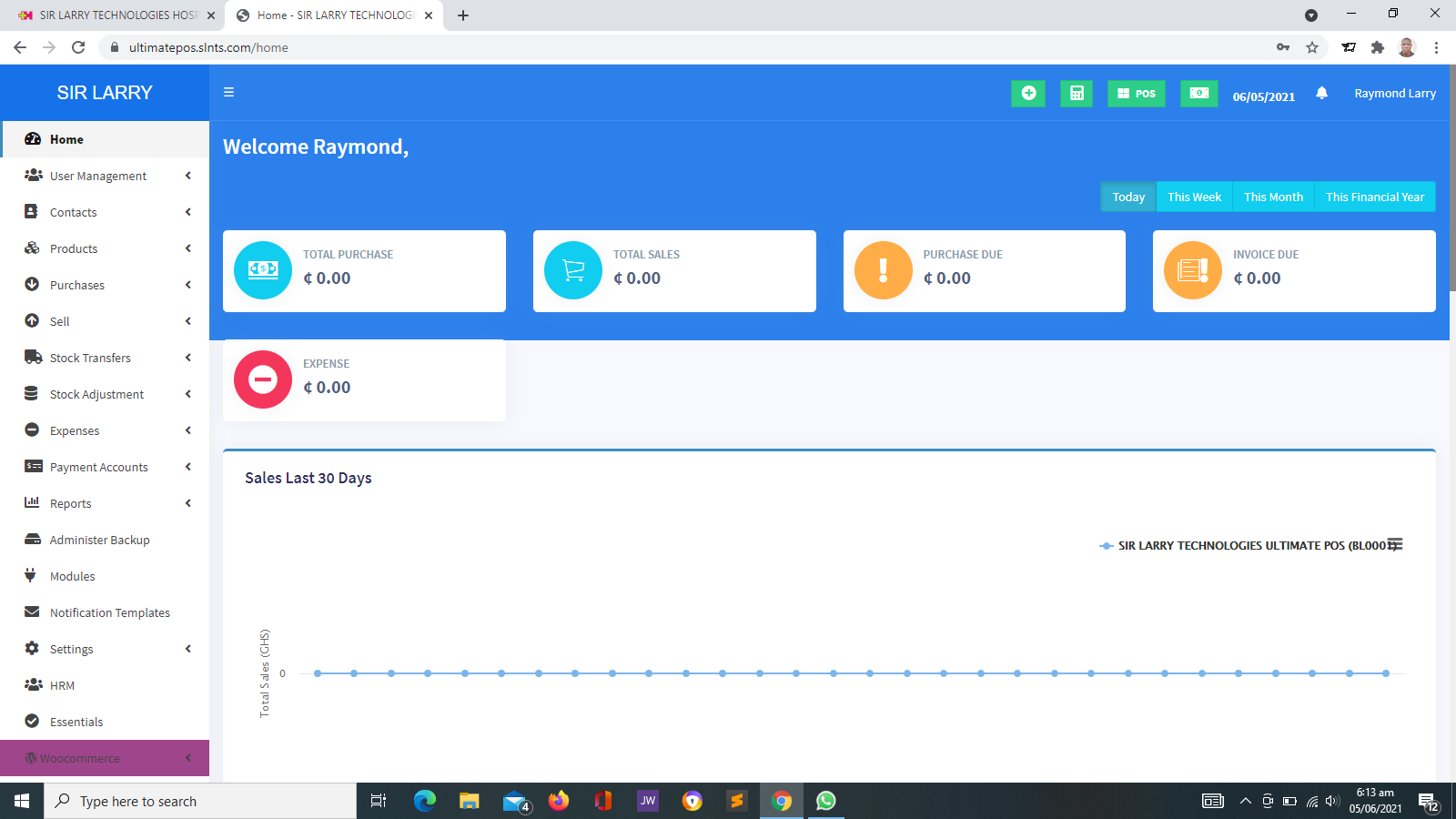
An Accounts Management System is software designed to help an organization record, organize and monitor its financial activities. Depending on its features, the system can support income and expense recording, invoicing, customer payments, supplier bills, bank reconciliation, budgeting and financial reporting.
What Is an Accounts Management System?
An Accounts Management System is a software application that helps businesses and institutions maintain organized financial records. It can replace or supplement manual bookkeeping methods such as paper ledgers and spreadsheets.
Organizations use these systems to record money received, money spent, amounts owed by customers, amounts payable to suppliers and other financial transactions. More comprehensive systems may also support general ledger accounting, fixed assets, budgeting and financial statements.
For example, a business can record sales income, enter supplier invoices, track customer balances, reconcile bank transactions and review its financial position through reports.
The features available depend on the software selected. Some systems focus on basic bookkeeping, while others provide a broader set of accounting and financial management functions.
Why Do Organizations Need an Accounts Management System?
Every organization needs reliable financial records to understand how money enters and leaves the business. When transactions are recorded inconsistently or stored in different places, it becomes more difficult to monitor balances, prepare reports and identify errors.
Organized Financial Records
Record transactions in a structured system so authorized users can locate financial information when needed.
Income and Expense Tracking
Monitor money received and spent to understand business activity and support financial planning.
Financial Visibility
Review available reports to understand revenue, costs, outstanding balances and other financial indicators.
More Efficient Accounting
Reduce repetitive calculations and manual record searches through structured data entry and supported automation.
Key Features of an Accounts Management System
Accounting systems differ in scope and complexity. The following are common features that organizations may consider when selecting a solution.
1. General Ledger
Maintain the main record of financial transactions organized under accounts such as assets, liabilities, equity, income and expenses. In a double-entry system, transactions are recorded using corresponding debit and credit entries.
2. Invoicing and Billing
Create customer invoices, record amounts due and track payment status. Depending on the system, invoices may include taxes, discounts, due dates and itemized products or services.
3. Payment Recording
Record payments received from customers and payments made to suppliers or other parties. Supported systems may also integrate with payment gateways or bank services.
4. Accounts Payable
Track supplier invoices, outstanding bills, payment due dates and amounts owed. This helps organizations organize their obligations and plan payments.
5. Accounts Receivable
Monitor customer invoices, outstanding debts, partial payments and overdue balances. Receivables reports can help identify customers who require payment follow-up.
6. Cash and Bank Management
Record cash movements, maintain bank-related entries and monitor available balances based on recorded transactions. Bank reconciliation tools may help compare accounting records with bank statements.
7. Income and Expense Management
Classify revenue and expenditure under appropriate categories to help management understand operating costs and income sources.
8. Financial Reports
Generate reports such as profit and loss statements, balance sheets, cash flow reports, trial balances and account summaries where supported and properly configured.
9. Tax and Statutory Reporting Support
Maintain relevant transaction details and produce available tax-related summaries. Tax calculations and reports depend on system configuration and the applicable requirements of the jurisdiction.
10. Inventory and Sales Integration
When integrated with a point-of-sale or inventory system, accounting software may receive sales, stock-related costs and other transaction data to support more complete financial records.
11. Budgeting and Financial Planning
Where supported, create budgets, compare actual performance against planned amounts and monitor spending across departments, projects or periods.
12. User Roles and Audit Trails
Control who can enter, approve or review financial transactions. Audit trails, where available, help authorized personnel examine important changes and transaction histories.
How an Accounts Management System Works
A typical accounting workflow begins when a financial transaction takes place and ends with the transaction being recorded, reviewed and reflected in relevant reports.
Benefits of Using an Accounts Management System
Improved Efficiency
Organized records and supported automation can reduce repetitive bookkeeping tasks and simplify routine accounting activities.
Better Financial Accuracy
Consistent transaction recording, validation rules and reconciliation processes can help reduce errors, although human review remains important.
Improved Cash Flow Monitoring
Records of expected receipts, outstanding invoices and upcoming payments can help management plan cash requirements.
Better Decision-Making
Financial reports help managers review income, expenses, profitability and other indicators when making business decisions.
Greater Accountability
Transaction histories, supporting documents and controlled permissions can improve financial oversight.
Easier Record Retrieval
Searchable financial records can make it easier to locate invoices, receipts, expenses and account histories.
Accounts Management System vs. Basic Bookkeeping
Basic bookkeeping involves recording and organizing financial transactions. An Accounts Management System provides software tools to support this work and may include additional accounting functions.
- Manual bookkeeping: Transactions are recorded in physical books or manually maintained spreadsheets. This can be suitable for simple operations but may require considerable effort as transaction volumes increase.
- Basic accounting software: Provides structured transaction entry, income and expense tracking, and selected reports.
- Comprehensive accounting system: May include general ledger accounting, accounts payable and receivable, bank reconciliation, financial statements, budgeting and other modules.
- Integrated business management system: Connects accounting with sales, inventory, purchasing, payroll or other operational functions where supported.
The best option depends on the size of the organization, the complexity of its transactions and the level of financial control required.
Accounts Management System vs. ERP
An Accounts Management System focuses primarily on financial records and accounting activities. An Enterprise Resource Planning (ERP) system typically connects multiple business functions within one platform.
- Accounts Management System: Primarily manages financial transactions, account balances, invoices, payments and accounting reports.
- ERP system: May combine accounting with inventory, purchasing, sales, human resources, production, project management and other business functions.
- Integrated approach: An organization may connect its accounting software to other applications rather than replacing every system with a single ERP platform.
A business that mainly needs reliable bookkeeping and financial reporting may find a dedicated accounting system sufficient. A business that needs coordinated management of several departments may benefit from a broader integrated platform.
Financial Reporting and Business Decisions
One of the most valuable functions of accounting software is its ability to turn recorded transactions into useful financial information.
Profit and Loss Statement
Summarizes income and expenses over a specified period to help show whether the organization made a profit or incurred a loss.
Balance Sheet
Shows assets, liabilities and equity at a particular date, providing a view of the organization's financial position.
Cash Flow Report
Helps explain cash movements and supports understanding of how money is received and spent during a period.
Receivables and Payables Reports
Summarize amounts owed by customers and amounts due to suppliers to support follow-up and payment planning.
Reports are only as reliable as the information entered into the system. Correct account setup, complete transaction records, appropriate adjustments and regular reconciliation are essential for meaningful results.
Tax, Compliance and Financial Recordkeeping
Organizations may use accounting software to organize records required for tax preparation, financial reviews and statutory reporting. However, the appropriate configuration depends on the organization's activities and applicable legal requirements.
- Maintain supporting invoices, receipts and transaction documentation.
- Configure relevant tax rates and accounting categories correctly.
- Keep financial records complete and organized for review.
- Restrict access to confidential financial information.
- Perform regular reconciliations and investigate discrepancies.
- Consult a qualified accountant or tax professional when interpreting complex requirements.
How to Choose the Right Accounts Management System
Before selecting accounting software, assess your organization's financial processes, reporting needs and budget.
- Business size: Consider transaction volume, number of users, branches and the complexity of operations.
- Accounting features: Determine whether you need basic bookkeeping, invoicing, inventory integration, payroll-related functions or full general ledger accounting.
- Financial reports: Confirm that the system can produce the reports required by management and your accountant.
- Local requirements: Check whether tax settings, currency handling and relevant reporting functions can be configured for your jurisdiction.
- Ease of use: Choose software that employees can learn and operate consistently.
- Integration: Check compatibility with POS, inventory, banking, payroll or other systems you already use.
- Security and backups: Understand user permissions, data protection, backup arrangements and recovery options.
- Total cost: Consider software fees, deployment, hosting, training, maintenance and integrations.
- Support and scalability: Ensure that the solution can support your organization's expected growth and future requirements.
Implementing an Accounts Management System Successfully
Successful implementation requires proper preparation, accurate financial data and clear accounting procedures.
Who Can Use an Accounts Management System?
Accounting software can support organizations of different sizes and across many industries.
- Retail shops and supermarkets: Record sales, expenses, supplier payments and other financial transactions.
- Pharmacies and distributors: Manage financial records and, where integrated, connect accounting with sales and inventory activities.
- Schools and educational institutions: Track approved financial activities, fee receipts, expenses and other institutional transactions.
- Hospitals and healthcare facilities: Organize operational income, expenses, supplier bills and other financial records.
- NGOs and nonprofit organizations: Track project expenditure, funding receipts, operational expenses and relevant financial reports.
- Professional service providers: Manage invoices, client payments, business expenses and outstanding balances.
- Manufacturing and distribution businesses: Support financial monitoring and, where available, integration with purchasing, inventory and operational systems.
- Small and medium-sized enterprises: Maintain more structured financial records as transaction volumes and reporting needs increase.
Accounts Management Solutions from Sir Larry Technologies
Sir Larry Technologies provides software development and IT services to organizations seeking to improve information management and business operations.
If your organization is considering an Accounts Management System, begin by identifying the financial processes you need to manage. Requirements may include income and expense tracking, customer invoicing, supplier bills, payment recording, financial reports or integration with POS and inventory applications.
The appropriate solution depends on your organization's accounting procedures, reporting requirements, budget and technical needs. Features, integrations, implementation arrangements and ongoing support should be confirmed before deployment.
Ready to Improve Your Financial Recordkeeping?
Visit Sir Larry Technologies to learn more about our software development and IT services. Discuss your organization's requirements to identify a practical approach to managing financial information and business processes.
Visit Sir Larry TechnologiesConclusion
An Accounts Management System helps organizations record financial transactions, organize invoices and payments, monitor outstanding balances and prepare useful financial reports.
When properly configured and maintained, accounting software can improve the organization of financial records, support more efficient processes and provide information for management decisions.
The best solution is one that matches your organization's actual accounting needs, supports appropriate financial controls and helps maintain reliable records for everyday operations and reporting.