






ERP Packages: Types, Features, Costs and How to Choose the Right Solution
Understand ERP software packages, their modules, deployment options and the factors organizations should consider before investing in an Enterprise Resource Planning system.
An Enterprise Resource Planning (ERP) package is a software solution designed to help an organization manage and coordinate important business activities through connected modules. Depending on the package, these activities may include accounting, inventory, procurement, human resources, sales, operations and reporting.
ERP packages differ in functionality, cost, complexity, deployment method and suitability for different organizations. Choosing the right one requires understanding your operational needs rather than selecting software based on popularity alone.
1. What Is an ERP Package?
An ERP package is a collection of integrated software modules that share information to support business operations. Instead of maintaining completely separate records for every department, an organization can use a connected system to reduce duplicated data entry and improve coordination.
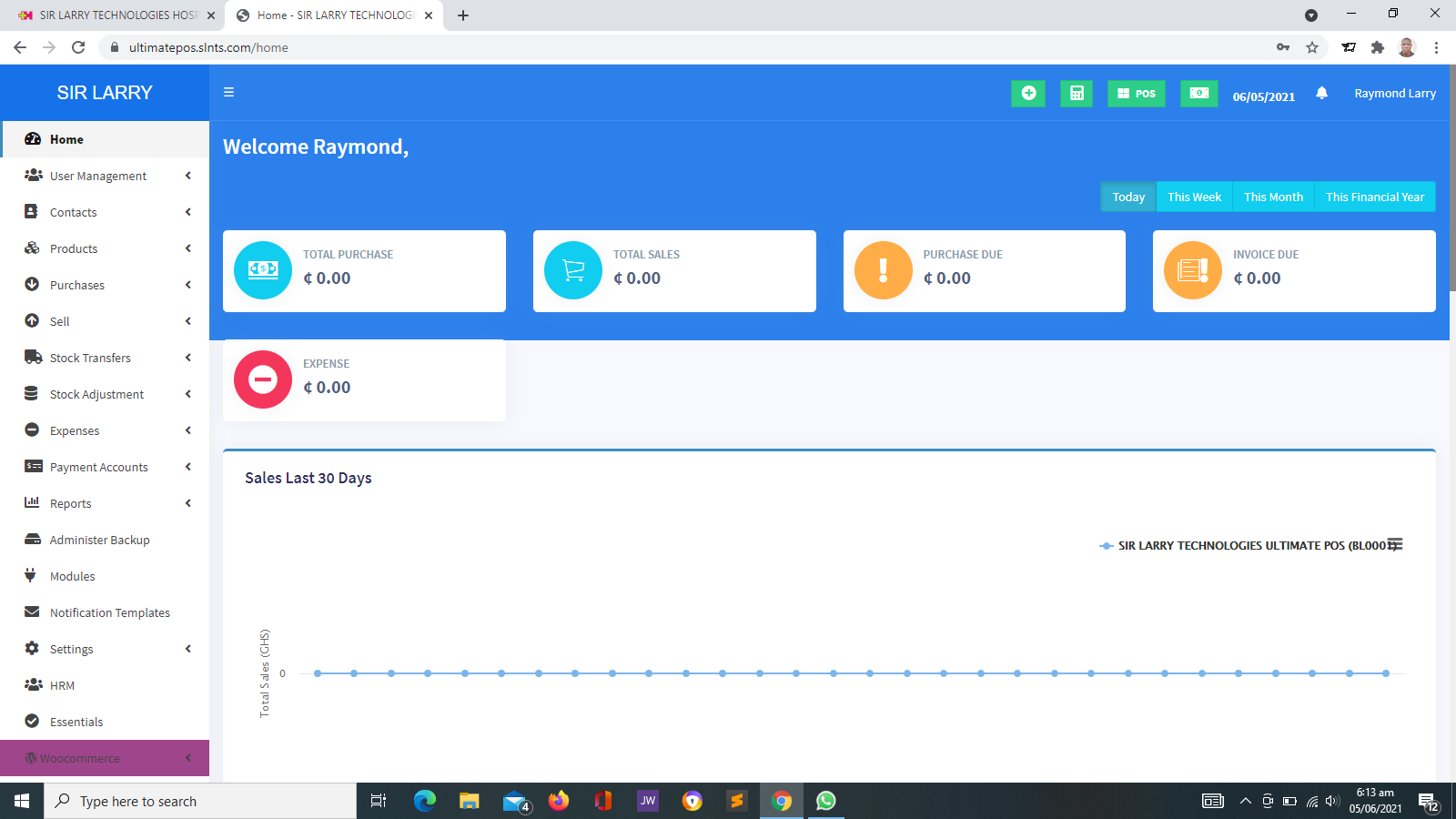
For example, when a business records a sale, an appropriately configured ERP system may update inventory, record the transaction for accounting and include the activity in management reports. The exact workflow depends on the software, enabled modules and system configuration.
2. Common Types of ERP Packages
ERP packages can be classified according to the size of the organization they serve, the industries they support, the way they are delivered and the functions they provide.
ERP Packages for Small Businesses
These generally focus on essential operations such as accounting, stock management, sales, purchasing and basic reporting. They may suit small retailers, distributors, service providers and growing businesses.
ERP Packages for Medium-Sized Businesses
These may support more complex workflows, multiple departments, approval processes, branch operations, detailed reporting and integration with other business applications.
Enterprise ERP Packages
Designed for organizations with complex operations, these may support multiple entities, locations, currencies, advanced controls, extensive integrations and large volumes of transactions.
Industry-Specific ERP Packages
These are designed around the processes of particular industries, such as manufacturing, distribution, construction or professional services. Their suitability depends on the functions provided by the specific product.
Cloud-Based ERP Packages
These are accessed through an internet connection and hosted in a cloud environment. Depending on the provider, the subscription may include hosting, updates, maintenance and technical support.
On-Premises ERP Packages
These are installed on infrastructure managed by the organization or its IT provider. They may offer greater control over the hosting environment but require suitable infrastructure, administration and maintenance.
3. Common Modules Found in ERP Packages
The available modules depend on the software package and the organization's subscription or implementation scope. Common ERP modules include:
| Module | Purpose |
|---|---|
| Accounting and Finance | Records financial transactions, manages accounts and supports financial reporting. |
| Inventory Management | Tracks stock quantities, product movement, stock adjustments and reorder requirements. |
| Procurement | Supports purchase requests, supplier records, purchase orders and purchasing approvals. |
| Sales Management | Helps manage sales orders, customer transactions, invoicing and related workflows. |
| Human Resources | May manage employee records, leave, attendance and other personnel processes. |
| Customer Management | Stores customer information and supports customer-related activities where included. |
| Production and Operations | May support production planning, materials, work orders and operational tracking. |
| Reporting and Analytics | Summarizes operational and financial information to support management decisions. |
| Document Management | May organize business documents and connect them to relevant records or workflows. |
Not every ERP package includes all these modules. Some require additional subscriptions, third-party applications, configuration or development to support particular requirements.
4. Examples of ERP Software Packages
Organizations researching ERP software may encounter products such as the following. Each product has its own licensing model, technical requirements, implementation approach and feature set.
SAP S/4HANA
An enterprise resource planning solution associated with complex business processes and large-scale organizational requirements. Suitability depends on the organization's needs and implementation capacity.
Oracle Fusion Cloud ERP
A cloud-based enterprise ERP offering that supports financial and other business management processes, depending on the selected applications.
Microsoft Dynamics 365
A family of business applications that includes ERP-oriented products for financial, operational and supply-chain processes, depending on the product selected.
Odoo
A modular business software platform offering applications for areas such as sales, inventory, accounting and other business functions. The available features depend on the selected edition, applications and configuration.
ERPNext
An open-source ERP platform with modules for functions such as accounting, stock, buying, selling, manufacturing and human resources, subject to the deployment and configuration used.
Other ERP Solutions
There are many other ERP products, including industry-focused and regional solutions. Organizations should evaluate each product against their own functional, financial and technical requirements.
5. Benefits of Choosing the Right ERP Package
A suitable ERP package can improve how an organization records, shares and uses operational information.
- Centralized information: Relevant departments can work with shared records instead of relying entirely on disconnected files.
- Reduced duplicate entry: Integrated workflows can reduce repeated recording of the same transaction.
- Improved stock visibility: Inventory modules can help users monitor quantities and product movement.
- Better financial oversight: Accounting and reporting functions can help management review transactions and financial performance.
- More consistent procedures: Approval workflows and user permissions can help standardize business processes.
- Faster reporting: Connected information can make it easier to prepare operational summaries.
- Support for growth: A suitable system may accommodate additional users, locations or modules as requirements evolve.
- Improved accountability: User permissions and available audit records can help identify who performed particular actions.
These benefits are not automatic. They depend on proper implementation, accurate data, staff training, suitable system configuration and effective management.
6. How to Choose the Right ERP Package
Before purchasing an ERP package, assess the organization's current operations and identify the problems the system should solve.
- Document your business processes. Identify how sales, purchasing, stock, finance, staffing and reporting are currently handled.
- List essential requirements. Separate features that are necessary from those that would simply be useful.
- Determine the required modules. Avoid paying for a large suite if a smaller combination of applications can meet your needs.
- Evaluate ease of use. Staff should be able to learn and use the system with appropriate training.
- Check local operating requirements. Consider the organization's location, currency needs, payment methods, tax-related processes and applicable compliance obligations.
- Review integration options. Confirm whether the system can connect to required websites, POS devices, payment services, email, SMS or other applications.
- Compare total cost. Include software fees, setup, data migration, hosting, training, support, integrations and future renewals.
- Assess security and backup arrangements. Review access permissions, backup schedules, recovery procedures and data ownership.
- Request a practical demonstration. Ask the provider to demonstrate workflows that reflect your actual operations.
- Confirm support arrangements. Establish who will handle technical issues, updates, maintenance and staff assistance.
7. ERP Package Costs and Pricing Considerations
There is no single price for all ERP packages. The cost depends on the product, the modules selected, the number of users, the deployment model and the complexity of the implementation.
Software Licensing or Subscription
Some products charge recurring fees, while others offer different licensing arrangements. Open-source availability does not necessarily mean the complete implementation will be free.
Setup and Configuration
Costs may include initial setup, workflow configuration, user accounts, permissions and preparation of the system for the organization.
Data Migration
Existing spreadsheets, paper records or older systems may require cleaning, formatting, validation and importing.
Hosting and Infrastructure
Cloud subscriptions, servers, domain services, backups and other infrastructure may create recurring or upfront expenses, depending on the arrangement.
Training and Support
Staff training, documentation, ongoing assistance and system maintenance should be included in the implementation budget.
Integrations and Additional Work
Payment gateways, SMS services, external applications, specialized reports and new workflows may involve separate development or third-party charges.
8. ERP Packages for Businesses and Organizations in Ghana
Organizations in Ghana should consider local operational requirements when evaluating an ERP package. A suitable system should fit the way the organization conducts business and manage the records it actually needs.
- Retailers and wholesalers: May need sales, inventory, purchasing, supplier records and financial reporting.
- Pharmacies and OTC medicine sellers: May require inventory tracking, sales recording, expiry monitoring and appropriate controls. Any regulatory or clinical requirements should be assessed separately.
- Schools and training institutions: May need finance, procurement, human resources and operational reporting. Dedicated education functions may require a separate school management or learning management system.
- NGOs and nonprofit organizations: May need finance, project expenditure, procurement, resource tracking and reporting. Specialized beneficiary or donor management may require additional modules or software.
- Service providers: May benefit from financial management, customer records, purchasing, staff management and service reporting.
- Multi-branch businesses: May require consolidated reporting, branch-level access controls and coordinated stock management.
Before implementation, confirm that the chosen package supports the organization's required currency, reporting practices, integrations and applicable Ghanaian legal and regulatory obligations. Obtain professional advice where tax, accounting or regulatory interpretation is required.
9. ERP Package vs. Separate Business Applications
An organization may choose a broad ERP package or combine several focused applications. Neither approach is automatically better; the choice depends on operational complexity, integration needs, budget and available technical support.
| Consideration | Integrated ERP Package | Separate Applications |
|---|---|---|
| Data sharing | May provide shared records and connected workflows within the suite. | May require integrations or manual transfers between applications. |
| Initial implementation | Can be more complex if many modules are deployed together. | Can start with a smaller application, but integration may add complexity later. |
| Flexibility | Depends on the package's modules and extension options. | Each application can be selected for a particular need. |
| Administration | May consolidate user management and reporting. | May involve multiple vendors, accounts and renewal schedules. |
| Best fit | Organizations needing coordinated processes across departments. | Organizations with limited requirements or specialized workflows. |
10. Common Mistakes to Avoid When Selecting an ERP Package
- Choosing a package solely because it is popular or heavily advertised.
- Purchasing more modules than the organization currently needs.
- Ignoring staff training and resistance to new workflows.
- Failing to clean and validate existing records before migration.
- Assuming every feature is included in the advertised price.
- Overlooking recurring costs for hosting, support, integrations and subscriptions.
- Failing to verify backup, restoration and data-export procedures.
- Expecting software alone to resolve unclear business procedures.
- Deploying every module at once without assessing implementation risks.
- Failing to agree on support responsibilities and service expectations.
11. A Practical ERP Implementation Process
After selecting a suitable package, the organization should follow a structured implementation process.
- Requirements assessment: Document the organization's needs, current systems and desired outcomes.
- Package evaluation: Compare suitable solutions through demonstrations and documented requirements.
- Project planning: Agree on the scope, timeline, budget, responsibilities and acceptance criteria.
- Configuration: Set up the required modules, workflows, users, roles and permissions.
- Data preparation: Clean, validate and migrate approved records.
- Testing: Check important workflows, reports, integrations, permissions and recovery arrangements.
- Staff training: Prepare users to perform their responsibilities correctly.
- Deployment: Introduce the system according to the agreed rollout plan.
- Monitoring and improvement: Resolve issues, collect feedback and review whether the system meets the original objectives.
12. Frequently Asked Questions About ERP Packages
What is the difference between an ERP system and an ERP package?
An ERP package is a software product or suite that can be used to establish an ERP system. The ERP system in an organization includes the selected software, its configuration, data, users, processes and supporting infrastructure.
Are ERP packages suitable for small businesses?
Yes. Some ERP products are designed for smaller organizations. A small business should choose a solution that matches its current requirements, budget and capacity to manage the system.
Is open-source ERP software free?
The software may be available under an open-source licence, but hosting, setup, configuration, training, support, maintenance and integrations can still incur costs. Licence terms should be reviewed before implementation.
Can an ERP package be accessed on mobile devices?
Some ERP packages provide mobile applications or responsive web interfaces. Mobile capabilities vary by product, module and deployment, so they should be tested before selection.
Can an ERP package integrate with a POS system?
Many ERP solutions can connect with POS systems, but integration depends on the products, supported interfaces and configuration. Confirm whether the connection is built in, available through an extension or requires development.
How long does ERP implementation take?
The timeline depends on the number of modules, complexity of workflows, data quality, integrations, staff availability and testing requirements. A focused implementation may be much shorter than a complex organization-wide deployment.
Can an organization change ERP packages later?
Yes, but moving to another package can require data export, data mapping, migration, retraining and process changes. Before selecting a product, check how the organization can export its data in a usable format.
Does every organization need a full ERP package?
No. Some organizations may need only accounting, inventory, POS, customer management or another focused application. The right solution is the one that meets the organization's requirements without unnecessary complexity or cost.
Conclusion
ERP packages help organizations coordinate business processes, improve information sharing and support management decisions. However, the most suitable package depends on the organization's size, industry, workflows, budget, integration requirements and future plans.
Before committing to a package, document your requirements, compare realistic options, evaluate total costs and test the workflows that matter most. A carefully planned implementation is more valuable than simply purchasing software with an extensive feature list.
Need Help Evaluating Business Software?
Sir Larry Technologies provides website development, POS and inventory solutions, business management software and related IT services. We can discuss your organization's requirements and help assess an appropriate digital solution based on the agreed scope.
Visit Sir Larry Technologies